بازگشت Back
فنی Technical مقالات Articles

آشنایی با مفاهیم ذخیره سازی اطلاعات ( +Storage ) – بخش سوم Understanding Single Mode vs. Multimode Fiber Optics for Data Storage

امیر رضا شکوه
امیر رضا شکوه Amirreza Shokuh
·
آشنایی با مفاهیم ذخیره سازی اطلاعات ( +Storage ) – بخش سوم

تفاوت های فیبرهای Single mode  و Multimode :


  1. قطر فیبرهای Single mode کمتر از Multimode است.

  2. Dispersion (پراکندگی – پخش شدن نور) در فیبرهای Single mode کمتر است و لذا می توانند مسافت بیشتری را ساپرت کنند.

  3. Distance (فاصله) که فیبرهای Single mode ساپرت میکنند بسیار بیشتر از فیبرهای Multimode است.

  4. Source نور در فیبرهای Single mode، لیزر و در فیبرهای LED، Multimode است.


نکته: اگر بخواهیم از Fiber optic cable به صورت Out door استفاده کنیم این کابل حتما باید از نوع Loose Tube  باشد.

کابل فیبر می تواند چندین core داشته باشد. تعداد Core ها تقسیم بر دو، تعداد Connectionها را بدست می دهد یعنی اگر بین دو مکان از یک فیبر Core 64، استفاده شود، تعداد 32 ،Connection را فراهم می کند مانند آن است که 32 کابل تک Core میان دو مکان کشیده شده باشد.

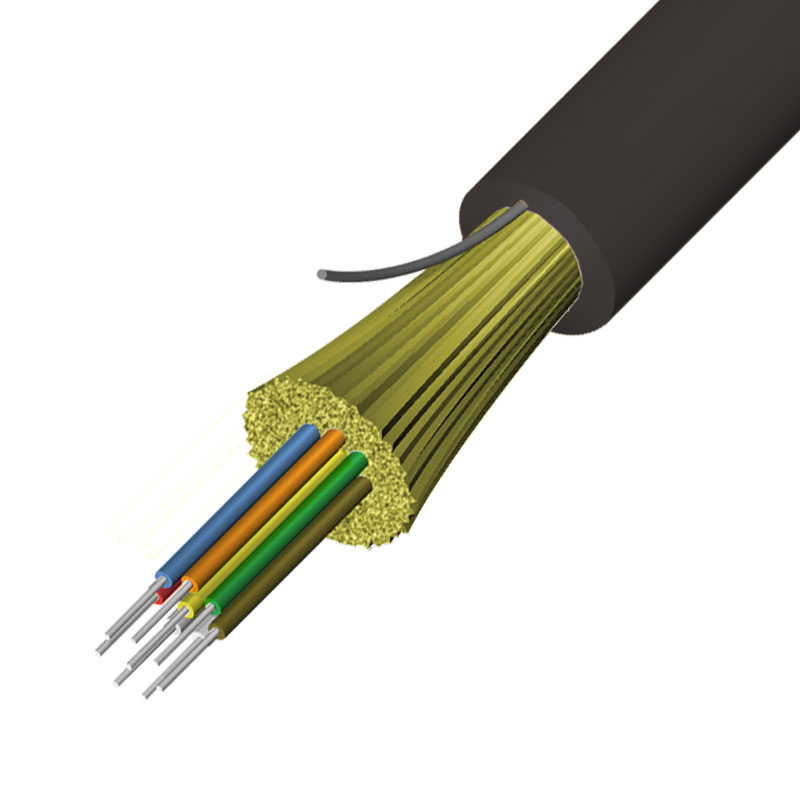
برای فیبرهایی که بصورت In-door استفاده می شو ند، Jacket آخرین لایه است که Core یا Coreها را نگهداری می کند و قابلیت انعطاف زیادی ندارد. اینگونه فیبرها     Tight buffer نامیده می شود.
02


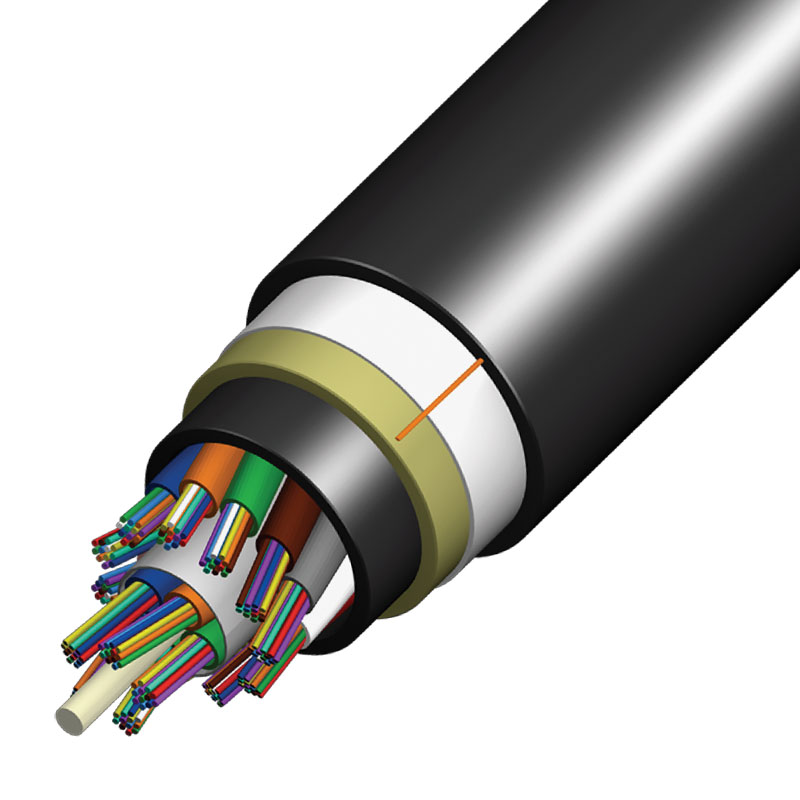
اما فیبرهایی که بصورت Out-Door مورد استفاده قرار می گیرند، یک لایه خرطومی شکل بعد از لایه Jacket وجود دارد که سبب انعطاف پذیری بیشتری فیبر می شود. به اینگونه فیبر ها ، Loose tube گفته می شود.
03


حداکثر مسافت جابه جایی توسط فیبر (single mode) ، 40km است.

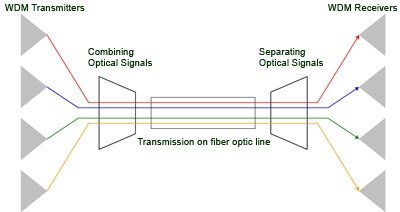
دستگاهی به نام Wavelength division multiplexer وجود دارد که از یک طرف چندین Core وارد آن می شوند و از طرف دیگر همگی آنها را از روی یک Core عبور می دهد.
04


Componentهای Fibre channel SAN :

Component -1 اصلی، سرورها هستند که میتواند EXSI،Windows ،Linux و ... باشد. برای اتصال به سرور از کارت HBA استفاده میشود.که میتواند 1 پورت، 2 پورت و نیز 4GB یا 8GB باشد. دو پورتHBA برای Redundancy استفاده می شود ، هر پورت به یک SAN Switch متصل میشود. و در نهایت هر HBA به یکی از دو Controller مجزای یک SAN متصل میشود. البته وجود دو HBA تک پورت بهتر از یک HBA دو پورت است.

2- Fabric Switch

3- Router ها و Gateway های مختلف

4- Storage Device که Core سیستم است و شامل Controller ها، Enclosure ها، H.D.D ها و ... می باشند

5- Backup Device ها مانند Tape Loader ها و Tape Library ها

اگر Fiber channel SAN داشته باشیم ، سرورها و در واقع سیستم عامل آنها باید HBA را ساپرت کنند و اگر ISCSI SAN داشته باشیم سرورها باید بتوانند ISCSI Initiator را ساپرت بنمایند.

حتی ESXI هم میتواند از روی Boot، Network شود. برخی سرورهای Blade ، هیچگونه H.D.D ندارد و در این سرورها ، ESXI از روی Boot، SAN می شود.

کارت شبکه HBA، دارای یک یا دو پورت است که در هر پورت یک SFP وجود دارد.

HBA، دستورات Read و Write بر روی storage را Encapsulate نموده و به Network ارسال میکند.یعنی این کار به عهده OS نیست.

اگر ISCSI SAN داشته باشیم ، به جای HBA ، از یک کارت به نام ISCSI Hardware Initiator استفاده می شود

معمول ترین سرعت کارت های 4Gbps، HBA و 8Gbps است.

در مباحث Security ، از قبیل اینکه LUN برای چه سیستم هایی قابل مشاهده باشد، WWN کارت های HBA استفاده می شود.

WWN به صورت بر چسب بر روی HBA وجود دارد و اگر وجود نداشت می توان از طریق OS سرور آن را استخراج نمود.

برای Present نمودن LUN به یک سرور، WWN کارت HBA آن سرور مورد نیاز است.

یکی از شرکت های مشهور تولید کننده SAN Switch ، شرکت Brocade است. Brocade Switch ها شبیه سوئیچ های MDS سیسکو هستند

Fabric Switch ها دارای تعدادی پورت SFP هستند که باید ماژول SFP وارد آنها شود. تعدادی از این پورت ها به صورت Default، Active هستند و برای فعال سازی بقیه باید License وارد نمود.

Fabric Switch ها دارای پورت های X2 نیز هستند که X2 Connector وارد آنها می شود (مانند SFP Connector). این پورت بر روی پهنای باند 10G کار میکند و از آن می توان برای اتصال Uplink به دیگر سوئیچ ها استفاده کرد.

SFP Connector نیز بر روی پهنای باند 10G کار میکند.

Console Port برای مدیریت اولیه سوئیچ از طریق کابل کنسول مورد استفاده قرار می کیرد.

MGMT Port یک پورت Ethernet است که برای مدیریت اولیه سوئیچ از طریق شبکه مورد استفاده قرار می گیرد.

طریقه Activation پورت های غیر فعال:

ابتدا Activation code ارسال شده به سازمان توسط فروشنده باید در سایت شرکت سازنده آن سوئیچ (HP یا Brocade یا Cisco و ....) با Serial number سوئیچ ، Register شود که در اینصورت یک License صادر می شود که آن License Key باید وارد سوئیچ شود.

نکته : در مورد سیسکو ، Regestrar باید اکانت CCO داشته باشد تا بتواند عملیات Register را انجام دهد. بنابراین حتما باید فروشنده ، تمامی پورت های سوئیچ را UP (فعال) تحویل دهد

نکته: اکانت CCO را یا Partner های سیسکو دارند و یا کسانی که مدرک CCIE دارند، دارای این اکانت هستند.

پورت های Fibre channel Getaway، بستگی به این دارد که این Getaway زیر ساخت Fibre channel را یه کدام زیر ساخت متصل میکند. مثلا اگر یک طرف زیر ساخت Fibre channel و طرف دیگر Ethernet باشد ، آنگاه Getaway دارای پورت های SFPو Ethernet خواهد بود.

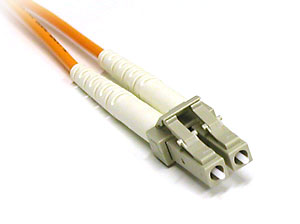
Connector که یک Patch cord فیبر را به SFP متصل می کند ، LC نامیده می شود.
05


دو Component اصلی Controller  ،Storage System و Disk Enclosure میباشد.

برخی از SAN Storage ها ، مانند Clariion EX یا EVA 4400 هنگام خریداری ، فقط دارای Controller هستند و مستقیما H.D.D بر روی آنها قرار نمی گیرد و باید برای آنها Enclosure خریداری شود اما برخی دیگر مانند MSA به صورت مستقیم می توان H.D.D بر روی خود آنها نصب کرد.

H.D.D های یک SAN می تواند به صورت JBOD باشد که هیچگونه Raid بین آنها وجود ندارد (منسوخ شده است) و یا به صورت Array باشد. که دارای Raid هستند.

در حالت JBOD ( Just a Bunch Of Disks ) نیز H.D.D ها با هم تشکیل یک گروه را می دهند و برای OS یک دیسک محسوب می شوند اما Fault Tolerance ندارد. Spanning، JBOD نیز نامیده می شود

هر نوع تکنولوژی و حتی هر قسمت از یک نوع تکنولوژی (مانند Exchange ) نیازمند Raid خاص خود است.

سیستم های Backup گیری شامل Auto loader ها و Tape library ها هستند. این Device ها دارای پورت Fibre Channel هستند که به Fabric Switch متصل می شوند

Tape به عنوان یک storage محسوب می شود که removable است. گاهی سیستم Tape خود دارای نرم افزار می باشد.
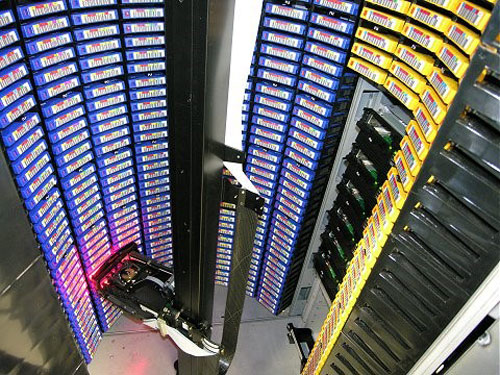
Tape Library Tape Library
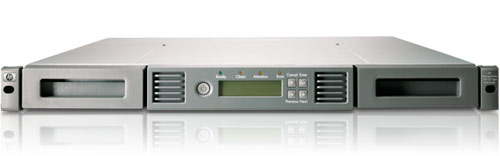
Tape Auto Loader Tape Auto Loader

Disk های مختلفی که می توان بر روی یک Storage نصب کرد عبارتند از : SATA، SAS و SSD

مزایایی که  با ایجاد یک RAID (redundant array of independent ) به وجود می آید، شامل موارد زیر است:


  1. فرآیند خواندن و نوشتن ، به صورت همزمان از روی چندین دیسک انجام می شود که سبب افزایش Performance می گردد.(فرآیند I/O)

  2. وجود چندین Disk، امکان بوجود آمدن Redundancy را فرآهم می آورد. تکنولوژیی های که به این منظور مورد استاده قرار می گیرد ، عبارتند از :


الف- Scribe نمودن Data: در این روش ،Data، به بلوک های مختلف تقسیم می شود و بر روی Disk Spindle های مختلف ( یا H.D.D های مختلف )نوشته می شود.

ب- Mirroring: در این روش ، Data در یک قسمت ( disk یا Array ) نوشته می شود، و مشابه همان Data در سمت دیگر (Disk یا Array دیگر) نوشته می شود.

ج- Parity: در این روش، دو بلوک Data در یک فرمول ریاضی قرار داده می شود و حاصل ، یک بلوک Data دیگر خواهد بود . هر کدام از این بلوک ها و بلوک Parity بر روی یک Disk یا Array قرار می گیرند و با از بین رفتن هر بلوک ، بلوک باقی مانده ، بعلاوه Parity بلوک از دست رفته را باز خواهد گرداند.

د- در تمامی مدل های Raid:


  1. بالا بردن تعداد Disk spindle ها، Performance را افزایش می دهد . بطور مثال اگر بجای دو H.D.D با ظرفیت 600GB از سه H.D.D با ظرفیت 400GB استفاده شود، Performance افزایش می یابد.

  2. Disk های مختلف ، تحت کنترل Controller های مختلف باشند. بطور مثال اگر هنگامی که  دو   Mirror، H.D.D  می شوند، یک Controller عملیات Mirroring را انجام ندهند و دو Controller بصورت همزمان عملیات Mirroring را بر روی دو H.D.D انجام دهند.(البته در برخی از Storage ها این کار ممکن نیست). با این کار نیز Performanceافزایش می یابد.


آشنایی با مفاهیم ذخیره سازی اطلاعات ( +Storage ) – بخش دوم

Differences between Single mode and Multimode fibers:


  1. The diameter of Single mode fibers is less than that of Multimode.

  2. Dispersion in Single mode fibers is less, thus they can support longer distances.

  3. The distance that Single mode fibers support is much greater than that of Multimode fibers.

  4. The light source in Single mode fibers is laser, while in Multimode fibers it is LED.


Note: If we want to use Fiber optic cable outdoors, this cable must be of the Loose Tube type.

The fiber cable can have multiple cores. The number of cores divided by two gives the number of connections, meaning if a fiber with 64 cores is used between two locations, it provides 32 connections, as if 32 single-core cables were pulled between the two locations.

For fibers used indoors, the jacket is the last layer that holds the core or cores and does not have much flexibility. Such fibers are called Tight buffer.

02


However, fibers used outdoors have a corrugated layer after the jacket layer that provides more flexibility to the fiber. Such fibers are called Loose tube .

03


The maximum distance supported by Single mode fiber is 40km.

There is a device called Wavelength division multiplexer that has multiple cores entering from one side and passes all of them through a single core from the other side.

04


Components of Fibre channel SAN:

Component -1 is the servers, which can be EXSI, Windows, Linux, etc. To connect to the server, an HBA card is used, which can have 1 port, 2 ports, and also 4GB or 8GB. Two HBA ports are used for redundancy, each connected to a SAN Switch. Finally, each HBA connects to one of the two separate controllers of a SAN. Of course, having two single-port HBAs is better than one dual-port HBA.

2- Fabric Switch

3- Various Routers and Gateways

4- Storage Device which is the core of the system and includes controllers, enclosures, H.D.Ds, etc.

5- Backup Devices such as Tape Loaders and Tape Libraries

If we have a Fiber channel SAN, the servers and their operating systems must support HBA, and if we have an ISCSI SAN, the servers must be able to support ISCSI Initiator.

Even ESXI can boot from the network. Some Blade servers have no H.D.D at all, and in these servers, ESXI boots from SAN.

The HBA network card has one or two ports, each with an SFP.

The HBA encapsulates Read and Write commands on storage and sends them to the network. This task is not the responsibility of the OS.

If we have an ISCSI SAN, instead of HBA, an ISCSI Hardware Initiator card is used.

The most common speeds for HBA cards are 4Gbps and 8Gbps.

In security discussions, such as which systems can see the LUN, the WWN of HBA cards is used.

WWN is labeled on the HBA, and if it is not present, it can be extracted through the server's OS.

To present a LUN to a server, the WWN of that server's HBA card is required.

One of the well-known manufacturers of SAN Switches is Brocade. Brocade Switches are similar to Cisco's MDS switches.

Fabric Switches have several SFP ports that require SFP modules to be inserted. Some of these ports are active by default, and to activate the rest, a license must be entered.

Fabric Switches also have X2 ports that accept X2 Connectors (like SFP Connectors). This port operates on a bandwidth of 10G and can be used to connect uplinks to other switches.

SFP Connectors also operate on a bandwidth of 10G.

The Console Port is used for initial switch management via a console cable.

The MGMT Port is an Ethernet port used for initial switch management over the network.

How to activate inactive ports:

First, the activation code sent to the organization by the vendor must be registered on the manufacturer's website of that switch (HP or Brocade or Cisco, etc.) with the switch's serial number, in which case a license will be issued that must be entered into the switch.

Note: Regarding Cisco, the registrar must have a CCO account to perform the registration operation. Therefore, the vendor must ensure that all switch ports are UP (active) upon delivery.

Note: CCO accounts are held by Cisco partners or those who have CCIE certification.

The ports of the Fibre channel Gateway depend on which infrastructure this Gateway connects the Fibre channel infrastructure to. For example, if one side is Fibre channel infrastructure and the other side is Ethernet, then the Gateway will have SFP and Ethernet ports.

The connector that connects a fiber patch cord to SFP is called LC.

05


The two main components are the Controller, Storage System, and Disk Enclosure.

Some SAN Storages, like Clariion EX or EVA 4400, only come with a Controller when purchased, and H.D.Ds are not directly placed on them; an enclosure must be purchased for them. However, others like MSA can have H.D.Ds installed directly on them.

The H.D.Ds of a SAN can be in JBOD format, which means there is no RAID among them (this is outdated), or in Array format, which has RAID.

In JBOD (Just a Bunch Of Disks), the H.D.Ds form a group and are considered a single disk by the OS, but they do not have fault tolerance. Spanning is also referred to as JBOD.

Every type of technology and even every part of a type of technology (like Exchange) requires its specific RAID.

Backup systems include auto loaders and tape libraries. These devices have Fibre Channel ports that connect to the Fabric Switch.

Tape is considered a removable storage. Sometimes the tape system itself has software.

Tape Library Tape Library

Tape Auto Loader Tape Auto Loader

Various disks that can be installed on a Storage include: SATA, SAS, and SSD

The benefits that arise from creating a RAID (redundant array of independent disks) include:


  1. The read and write process is performed simultaneously from multiple disks, which increases performance (I/O process).

  2. The presence of multiple disks provides redundancy. The technologies used for this purpose include:


a- Scribing Data: In this method, data is divided into different blocks and written on different disk spindles (or different H.D.Ds).

b- Mirroring: In this method, data is written in one part (disk or array), and the same data is written in another part (another disk or array).

c- Parity: In this method, two blocks of data are placed in a mathematical formula, and the result is another block of data. Each of these blocks and the parity block are placed on a disk or array, and with the loss of any block, the remaining block, along with the lost parity block, will restore it.

d- In all RAID models:


  1. Increasing the number of disk spindles enhances performance. For example, if instead of two H.D.Ds with a capacity of 600GB, three H.D.Ds with a capacity of 400GB are used, performance increases.

  2. Different disks can be controlled by different controllers. For example, if when two H.D.Ds are mirrored, one controller does not perform the mirroring operation, and two controllers simultaneously perform the mirroring operation on two H.D.Ds (though this may not be possible in some storages). This also increases performance.


Familiarity with Information Storage Concepts (+Storage) – Part Two

برچسب‌ها: Tags: Auto loader هاComponentهای Fibre channel SANDispersion (پراکندگی – پخش شدن نور)JBOD ( Just a Bunch Of Disks )Loose TubeMirroringParityPresent نمودن LUNRAID (redundant array of independent )Scribe نمودن DataTape library هاX2 Connector

دیدگاه‌ها Comments

هنوز دیدگاهی ثبت نشده. No comments yet.